If you’ve been working with employee survey data for a while, you’re probably familiar with Relative Weights Analysis (RWA). But for those of us who started working with this type of data on a regular basis more recently, discovering RWA can be a (very welcome) surprise. 🤓
RWA is a statistical technique used to assess the relative importance of predictor variables in multiple regression models, particularly when multicollinearity is present. When predictors are highly correlated—which is very common in employee survey data—traditional regression coefficients (beta weights) can become unstable and difficult to interpret, making it nearly impossible to gauge the true importance of any single predictor.
RWA tackles this by transforming the correlated predictors into a set of orthogonal (uncorrelated) variables that are maximally related to the originals. From there, it partitions the model’s total explained variance (), attributing a specific percentage to each predictor.
A key advantage is that these percentages—the relative weights—conveniently sum to 100% of the explained variance, providing a complete and intuitive breakdown of what drives the outcome. Crucially, each predictor’s resulting weight represents its total share of the credit for explaining the outcome — a single number that fairly incorporates both the predictor’s unique explanatory power and its proportional share of the variance it shares with correlated predictors. RWA does not separate these two components; instead, it blends them into one weight per predictor, which is why the weights sum cleanly to 100% of the explained variance.
As you can imagine, this makes RWA especially useful for key drivers analysis of employee survey data when we want to determine the relative importance of (typically highly intercorrelated) survey items or indices for prediction of overall scores or external outcomes.
One just needs to remember that these weights still reflect only association, not causation. Moreover, determining the statistical significance of individual relative weights isn’t straightforward, as their sampling distribution isn’t well-defined. However, with bootstrapping, estimating the corresponding confidence intervals becomes quite easy.
Any helpful tips from folks who’ve used RWA more extensively? If so, feel free to share them in the comments.
P.S. If interested, you can find an example of this method in action using the rwa R package below.
We will use a sample dataset that accompanies the book Predictive HR Analytics: Mastering the HR Metric by Edwards & Edwards (2019). It contains the survey responses of 832 employees on a 1 ‘strongly disagree’ to 5 ‘strongly agree’ response scale for a following set of statements.
# uploading libraries
library(readxl)
library(DT)
library(tidyverse)

# uploading legend to the data
legend <- readxl::read_excel("./surveyResults.xls", sheet = "Legend")

# user-friendly table with individual survey items
DT::datatable(
  legend %>% dplyr::mutate(Scale = as.factor(Scale)),
  class = 'cell-border stripe',
  filter = 'top',
  extensions = 'Buttons',
  fillContainer = FALSE,
  rownames= FALSE,
  options = list(
    pageLength = 5,
    autoWidth = TRUE,
    dom = 'Bfrtip',
    buttons = c('copy'),
    scrollX = TRUE,
    selection="multiple"
  )
)
Showing 20 of 29 rows and all 3 columns. View the full interactive table in the original post.
| Scale | Item | Text |
|---|---|---|
| Managerial motivation | ManMot1 | My manager motivates me. |
| Managerial motivation | ManMot2 | My manager knows how to get the most out of me. |
| Managerial motivation | ManMot3 | My manager encourages me to do my best. |
| Managerial motivation | ManMot4 | My manager is great. |
| Organizational citizenship behavior | ocb1 | I work harder than my job requires. |
| Organizational citizenship behavior | ocb2 | I put a huge amount of effort into my job. |
| Organizational citizenship behavior | ocb3 | I help out my teammates. |
| Organizational citizenship behavior | ocb4 | I go the extra mile. |
| Autonomy | aut1 | I have the freedom to choose how I work. |
| Autonomy | aut2 | I can decide how to work during the day. |
| Autonomy | aut3 | I am given enough leeway to get the job done. |
| Procedural justice | Justice1 | Procedures are fair here. |
| Procedural justice | Justice2 | Procedures are applied fairly. |
| Procedural justice | Justice3 | Procedures are the same for all. |
| Job satisfaction | JobSat1 | I am satisfied in my job. |
| Job satisfaction | JobSat2 | My job is good. |
| Quitting intentions | Quit1 | I am thinking of leaving. |
| Quitting intentions | Quit2 | I am ready to look for other work. |
| Quitting intentions | Quit3 | I have looked for employment elsewhere in the last week. |
| Management | Man1 | Management help workers out when they experience difficulties. |
And here is a table with the survey responses we will analyse.
# uploading data
data <- readxl::read_excel("./surveyResults.xls", sheet = "Data")

# selecting relevant vars
mydata <- data %>%
  dplyr::select(ManMot1:pos3)

# user-friendly table with the data used in the analysis
DT::datatable(
  mydata,
  class = 'cell-border stripe',
  filter = 'top',
  extensions = 'Buttons',
  fillContainer = FALSE,
  rownames= FALSE,
  options = list(
    pageLength = 5,
    autoWidth = TRUE,
    dom = 'Bfrtip',
    buttons = c('copy'),
    scrollX = TRUE,
    selection="multiple"
  )
)
Showing 20 of 832 rows and all 29 columns. View the full interactive table in the original post.
| ManMot1 | ManMot2 | ManMot3 | ManMot4 | ocb1 | ocb2 | ocb3 | ocb4 | aut1 | aut2 | aut3 | Justice1 | Justice2 | Justice3 | JobSat1 | JobSat2 | Quit1 | Quit2 | Quit3 | Man1 | Man2 | Man3 | Eng1 | Eng2 | Eng3 | Eng4 | pos1 | pos2 | pos3 |
|---|---|---|---|---|---|---|---|---|---|---|---|---|---|---|---|---|---|---|---|---|---|---|---|---|---|---|---|---|
| 1 | 1 | 1 | 2 | 1 | 2 | 3 | 4 | 1 | 1 | 1 | 3 | 3 | 3 | 2 | 3 | 4 | 4 | 4 | 2 | 2 | 2 | 2 | 2 | 2 | 3 | 3 | 3 | 3 |
| 3 | 2 | 3 | 4 | 2 | 2 | 2 | 1 | 4 | 4 | 4 | 3 | 3 | 3 | 4 | 4 | 2 | 2 | 2 | 2 | 2 | 2 | 4 | 4 | 2 | 4 | 4 | 4 | |
| 4 | 3 | 4 | 4 | 2 | 1 | 3 | 3 | 1 | 2 | 2 | 5 | 5 | 5 | 2 | 2 | 3 | 4 | 4 | 5 | 5 | 5 | 2 | 1 | 1 | 1 | 4 | 2 | 4 |
| 2 | 2 | 2 | 2 | 3 | 3 | 3 | 5 | 2 | 3 | 2 | 3 | 3 | 4 | 3 | 3 | 2 | 2 | 2 | 3 | 3 | 3 | 2 | 2 | 3 | 2 | 3 | 3 | 3 |
| 2 | 2 | 2 | 2 | 1 | 2 | 2 | 1 | 4 | 4 | 4 | 3 | 4 | 3 | 3 | 2 | 3 | 3 | 3 | 3 | 3 | ||||||||
| 2 | 2 | 3 | 2 | 3 | 2 | 5 | 1 | 2 | 3 | 3 | 2 | 2 | 3 | 2 | 2 | 3 | 2 | 2 | 2 | 2 | 2 | 2 | 2 | 2 | 3 | 4 | 4 | 4 |
| 4 | 1 | 4 | 2 | 2 | 4 | 4 | 4 | 2 | 2 | 2 | 5 | 5 | 4 | 2 | 2 | 5 | 5 | 5 | 5 | 5 | 5 | 2 | 1 | 1 | 1 | 4 | 3 | 3 |
| 2 | 2 | 2 | 2 | 2 | 1 | 2 | 1 | 2 | 2 | 2 | 5 | 5 | 3 | 3 | 3 | 2 | 2 | 2 | 3 | 3 | 3 | 3 | 5 | 5 | 5 | |||
| 1 | 1 | 1 | 1 | 2 | 2 | 3 | 3 | 2 | 2 | 2 | 2 | 2 | 2 | 2 | 2 | 3 | 3 | 3 | 2 | 1 | 1 | 2 | 2 | 2 | 2 | 4 | 2 | 2 |
| 2 | 2 | 2 | 2 | 1 | 1 | 1 | 5 | 5 | 5 | 3 | 3 | 2 | 2 | 2 | 4 | 4 | 4 | 3 | 4 | 3 | 3 | 4 | 4 | 4 | ||||
| 3 | 2 | 3 | 3 | 1 | 2 | 1 | 3 | 2 | 2 | 2 | 3 | 3 | 3 | 2 | 2 | 5 | 5 | 3 | 2 | 2 | 2 | 3 | 2 | 2 | 4 | 3 | 2 | 3 |
| 2 | 2 | 2 | 2 | 2 | 3 | 3 | 2 | 2 | 2 | 2 | 3 | 3 | 3 | 2 | 2 | 3 | 4 | 3 | 2 | 2 | 2 | 3 | 3 | 3 | 3 | 3 | 3 | 3 |
| 2 | 1 | 2 | 2 | 2 | 2 | 2 | 3 | 2 | 2 | 2 | 4 | 4 | 4 | 2 | 2 | 2 | 1 | 2 | 2 | 3 | 3 | 3 | 2 | 2 | 3 | 3 | 3 | 3 |
| 1 | 1 | 2 | 1 | 1 | 2 | 2 | 3 | 1 | 1 | 1 | 2 | 3 | 3 | 2 | 2 | 5 | 5 | 5 | 1 | 1 | 1 | 2 | 2 | 2 | 2 | 3 | 2 | 3 |
| 2 | 2 | 2 | 2 | 2 | 2 | 2 | 1 | 1 | 2 | 1 | 3 | 3 | 4 | 2 | 1 | 4 | 4 | 5 | 2 | 2 | 2 | 2 | 2 | 3 | 2 | 4 | 4 | 4 |
| 3 | 3 | 3 | 3 | 1 | 3 | 3 | 2 | 2 | 2 | 2 | 3 | 3 | 3 | 2 | 1 | 4 | 4 | 4 | 3 | 3 | 3 | 3 | 3 | 3 | 3 | 3 | 3 | 3 |
| 2 | 2 | 2 | 2 | 2 | 4 | 3 | 5 | 2 | 2 | 2 | 3 | 3 | 3 | 2 | 3 | 3 | 4 | 3 | 3 | 4 | 3 | 4 | 2 | 3 | 3 | 4 | 3 | 3 |
| 3 | 2 | 3 | 4 | 2 | 2 | 2 | 3 | 3 | 3 | 2 | 5 | 5 | 5 | 2 | 3 | 4 | 4 | 4 | 3 | 3 | 3 | 2 | 2 | 2 | 3 | 3 | 3 | 3 |
| 2 | 2 | 3 | 2 | 1 | 2 | 2 | 3 | 1 | 1 | 1 | 3 | 3 | 3 | 1 | 1 | 5 | 5 | 5 | 2 | 2 | 2 | 4 | 3 | 3 | 3 | 2 | 2 | 2 |
| 2 | 1 | 2 | 2 | 2 | 2 | 2 | 2 | 3 | 2 | 1 | 4 | 4 | 4 | 2 | 2 | 4 | 4 | 4 | 3 | 2 | 3 | 2 | 1 | 3 | 1 | 4 | 4 | 4 |
For the analysis, we’ll need to make some adjustments to the data and compute scale scores based on the relevant items.
# preparing the data for analysis
mydata <- mydata %>%
  # adding employee ID
  dplyr::mutate(employee_id = row_number()) %>%
  # changing data format from wide to long
  tidyr::pivot_longer(ManMot1:pos3, names_to = 'item', values_to = 'rating') %>%
  # adding information about the scales individual items belong to
  dplyr::left_join(legend %>% select(Scale, Item), by = c('item'='Item'), keep = FALSE) %>%
  dplyr::rename('scale' = 'Scale') %>%
  # computing scores for individual scales from relevant items
  dplyr::group_by(employee_id, scale) %>%
  dplyr::summarise(score = mean(rating, na.rm = TRUE), .groups = 'drop') %>%
  # changing data format back to wide
  tidyr::pivot_wider(names_from = 'scale', values_from = 'score')


# user-friendly table with the data used in the analysis
DT::datatable(
  mydata,
  class = 'cell-border stripe',
  filter = 'top',
  extensions = 'Buttons',
  fillContainer = FALSE,
  rownames= FALSE,
  options = list(
    pageLength = 5,
    autoWidth = TRUE,
    dom = 'Bfrtip',
    buttons = c('copy'),
    scrollX = TRUE,
    selection="multiple"
  )
)
Showing 20 of 832 rows and all 10 columns. View the full interactive table in the original post.
| employee_id | Autonomy | Engagement | Job satisfaction | Management | Managerial motivation | Organizational citizenship behavior | Perceived organizational support | Procedural justice | Quitting intentions |
|---|---|---|---|---|---|---|---|---|---|
| 1 | 1 | 2.25 | 2.5 | 2 | 1.25 | 2.5 | 3 | 3 | 4 |
| 2 | 4 | 3.333333333333333 | 4 | 2 | 3 | 1.75 | 4 | 3 | 2 |
| 3 | 1.666666666666667 | 1.25 | 2 | 5 | 3.75 | 2.25 | 3.333333333333333 | 5 | 3.666666666666667 |
| 4 | 2.333333333333333 | 2.25 | 3 | 3 | 2 | 3.5 | 3 | 3.333333333333333 | 2 |
| 5 | 2.75 | 3.333333333333333 | 2 | 1.5 | 3 | 4 | |||
| 6 | 2.666666666666667 | 2.25 | 2 | 2 | 2.25 | 2.75 | 4 | 2.333333333333333 | 2.333333333333333 |
| 7 | 2 | 1.25 | 2 | 5 | 2.75 | 3.5 | 3.333333333333333 | 4.666666666666667 | 5 |
| 8 | 2 | 3 | 5 | 2 | 2 | 1.5 | 5 | 3 | |
| 9 | 2 | 2 | 2 | 1.333333333333333 | 1 | 2.5 | 2.666666666666667 | 2 | 3 |
| 10 | 1 | 3.25 | 3 | 4 | 2 | 4 | 5 | 2 | |
| 11 | 2 | 2.75 | 2 | 2 | 2.75 | 1.75 | 2.666666666666667 | 3 | 4.333333333333333 |
| 12 | 2 | 3 | 2 | 2 | 2 | 2.5 | 3 | 3 | 3.333333333333333 |
| 13 | 2 | 2.5 | 2 | 2.666666666666667 | 1.75 | 2.25 | 3 | 4 | 1.666666666666667 |
| 14 | 1 | 2 | 2 | 1 | 1.25 | 2 | 2.666666666666667 | 2.666666666666667 | 5 |
| 15 | 1.333333333333333 | 2.25 | 1.5 | 2 | 2 | 1.75 | 4 | 3.333333333333333 | 4.333333333333333 |
| 16 | 2 | 3 | 1.5 | 3 | 3 | 2.25 | 3 | 3 | 4 |
| 17 | 2 | 3 | 2.5 | 3.333333333333333 | 2 | 3.5 | 3.333333333333333 | 3 | 3.333333333333333 |
| 18 | 2.666666666666667 | 2.25 | 2.5 | 3 | 3 | 2.25 | 3 | 5 | 4 |
| 19 | 1 | 3.25 | 1 | 2 | 2.25 | 2 | 2 | 3 | 5 |
| 20 | 2 | 1.75 | 2 | 2.666666666666667 | 1.75 | 2 | 4 | 4 | 4 |
In our example, we’ll focus on selected relevant predictors of quitting intentions. First, we’ll use a pair plot to explore the relationships among the individual scales. Our main interest lies in the correlations between these predictors and quitting intentions, but we’ll also examine the intercorrelations among the predictors themselves, as these can indicate how much RWA might help us address potential multicollinearity.
library(GGally)

# setting outcome variable and predictors
outcome <- 'Quitting intentions'
predictors <- c('Autonomy', 'Management', 'Managerial motivation', 'Procedural justice', 'Perceived organizational support')

# checking correlations between survey scales

# custom functions for diag and lower panels
lower_fn <- function(data, mapping, ...) {
  ggplot(data = data, mapping = mapping) +
    ggplot2::geom_point(alpha = 0.5) +
    ggplot2::geom_smooth(method = "lm", se = FALSE, color='darkred', ...) +
    ggplot2::theme_minimal() +
    ggplot2::theme(
      panel.grid.minor.y = element_blank(),
      panel.grid.minor.x = element_blank()
    )
}

diag_fn <- function(data, mapping, ...) {
  ggplot2::ggplot(data = data, mapping = mapping) +
    ggplot2::geom_density(fill = "skyblue", color = "skyblue", ...) +
    ggplot2::theme_minimal() +
    ggplot2::theme(
      panel.grid.minor.y = element_blank(),
      panel.grid.minor.x = element_blank()
    )
}

# ggpairs call
GGally::ggpairs(
  mydata %>% select(outcome, predictors),
  lower = list(continuous = lower_fn),
  diag  = list(continuous = diag_fn)
)
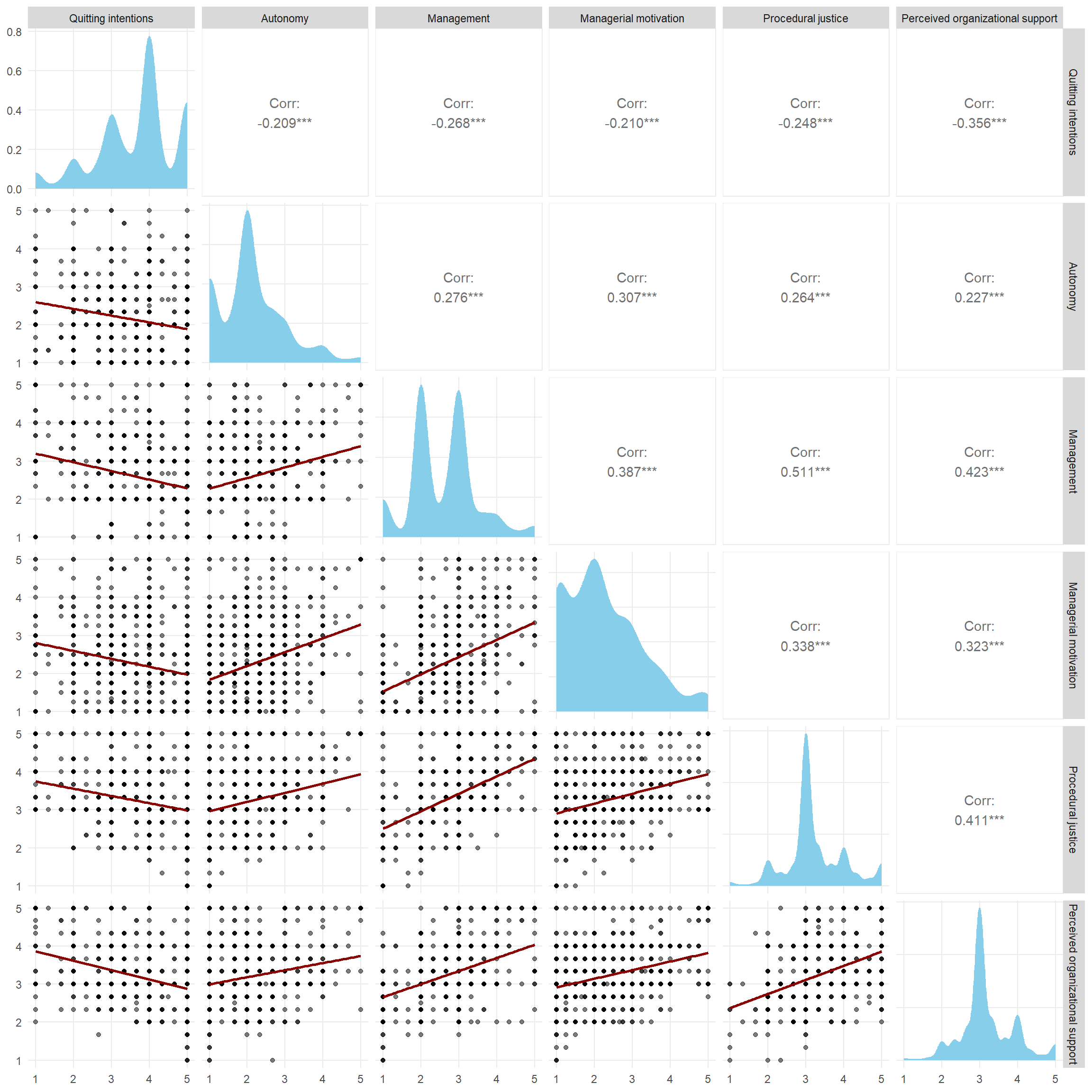
In the top row of the pair plot, we can see that Quitting Intentions are moderately negatively correlated with the other scales—most strongly with Perceived Organizational Support (around r=-0.35), followed by Management and Procedural Justice (around r=-0.25), and finally with Management Motivation and Autonomy (around r=-0.20). Correlations between the predictor variables themselves are slightly higher but still fall within the moderate range. The highest correlation is around r=0.5 between Procedural Justice and Management. This suggests that multicollinearity should not be an issue, but still, the intercorrelations are big enough to have an impact on our efforts to estimate relative importance of individual predictors. Let’s see how it plays out.
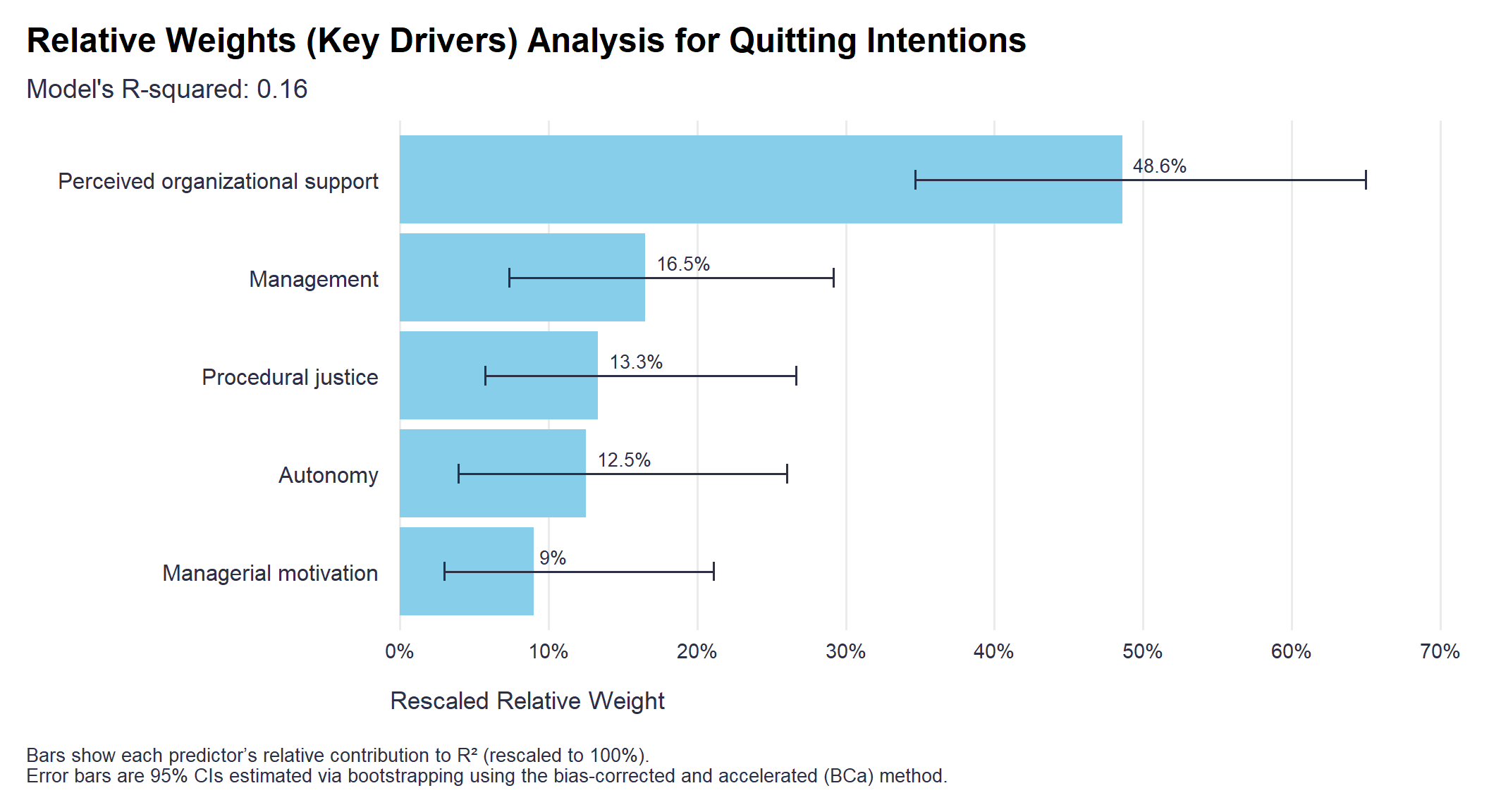
After running the RWA, we can see from the table below that the overall regression model explains about 16% of the variability in quitting intentions, and nearly 50% of this predictive power is attributable to Perceived Organizational Support, while the remaining predictors each contribute between 10% and 15%.
library(rwa)

# running the RWA model
model <- rwa::rwa(
  mydata,
  outcome = outcome,
  predictors = predictors,
  applysigns = TRUE,
  plot = FALSE
)

# extracting the R-squared value
r_squared <- model$rsquare
print(paste("R-squared:", round(r_squared, 3)))

# creating df with the results
results_df <- data.frame(
  "Predictor" = predictors,
  "Rescaled Weight" = model$result$Rescaled.RelWeight
)

results_df %>%
  dplyr::arrange(desc(Rescaled.Weight)) %>%
  print()
These numbers differ quite a bit from what we’d get by simply converting the correlation coefficients above into percentages—in that case, the predictors would appear more similar in their impact.
# running Persoan correlation analysis
cor(
  mydata %>% select(outcome, predictors),
  use    = "pairwise.complete.obs",
  method = "pearson"
) %>%
  as.data.frame() %>%
  tibble::rownames_to_column(var = "Predictor") %>%
  dplyr::select(Predictor, `Quitting intentions`) %>%
  dplyr::rename("Correlation" = "Quitting intentions") %>%
  dplyr::filter(Predictor != "Quitting intentions") %>%
  dplyr::mutate(
    "Rescaled Correlation" = round(abs(Correlation)/sum(abs(Correlation))*100,1)
  ) %>%
  dplyr::arrange(desc(abs(Correlation)))
And they’re also quite different from the rescaled coefficients from the standard multiple regression analysis—which suggests our efforts with RWA weren’t in vain. 😉
library(broom)

# creating a copy of mydata with properly named vars for using formula in the glm function
modeling_data <- setNames(mydata, make.names(names(mydata)))

# fitting the GLM
model_lm <- glm(
  Quitting.intentions ~ Management + Job.satisfaction + Managerial.motivation + Procedural.justice + Perceived.organizational.support,
  data   = modeling_data ,
  family = gaussian(link = "identity")
)

# making model summary tidy + computing rescaled coefficient estimates for comparison
broom::tidy(model_lm, conf.int = TRUE) %>%
  filter(term != "(Intercept)") %>%
  select(
    Predictor   = term,
    Estimate    = estimate,
    SE          = std.error,
    `CI Lower`  = conf.low,
    `CI Upper`  = conf.high,
    `p-value`   = p.value
  ) %>%
  dplyr::arrange(desc(abs(Estimate))) %>%
  dplyr::mutate(
    `Rescaled Estimate` = round(abs(Estimate)/sum(abs(Estimate))*100,1)
  ) %>%
  dplyr::select(Predictor, `Rescaled Estimate`, everything())
We may also want to quantify the uncertainty around our estimates of the relative weights. To do that, we’ll use a bootstrapping method, since the sampling distribution of relative weights isn’t well-defined. The resulting estimates, along with their 95% confidence intervals, are shown in the bar chart below.
library(boot)

# estimating CI using bootstrapping

# function to compute raw and rescaled relative weights with signs
compute_rwa <- function(data, indices) {
  sample_data <- data[indices, ]
  model <- rwa::rwa(
    sample_data,
    outcome = outcome,
    predictors = predictors,
    applysigns = TRUE,
    plot = FALSE
  )
  return(model$result$Rescaled.RelWeight)
}


# setting seed for reproducibility
set.seed(2025)

# performing bootstrap
boot_results <- boot::boot(
  data = mydata,
  statistic = compute_rwa,
  R = 10000
)

# initializing a matrix to store confidence intervals
boot_cis <- matrix(NA, nrow = length(predictors), ncol = 2)
rownames(boot_cis) <- predictors
colnames(boot_cis) <- c("CI_lower", "CI_upper")

# calculating confidence intervals for each predictor using BCa method
for (i in 1:length(predictors)) {
  ci <- boot::boot.ci(boot_results, type = "bca", index = i, conf = 0.95)
  boot_cis[i, ] <- ci$bca[4:5]
}

# calculating mean relative weights
# relative_weights <- colMeans(boot_results$t)

# creating a df with results
final_results <- data.frame(
  Predictor = predictors,
  RescaledWeight = results_df[, "Rescaled.Weight"],
  CI_Lower = boot_cis[, "CI_lower"],
  CI_Upper = boot_cis[, "CI_upper"]
)

# display the results
# print(final_results)


# visualizing the results

# ensuring predictors are treated as ordered factors
final_results <- final_results %>%
  dplyr::mutate(Predictor = forcats::fct_reorder(Predictor, RescaledWeight, .desc = FALSE))

ggplot2::ggplot(final_results, aes(x = Predictor, y = RescaledWeight)) +
  ggplot2::geom_bar(stat = "identity", fill = "skyblue") +
  ggplot2::geom_errorbar(
    aes(ymin = CI_Lower, ymax = CI_Upper),
    width = 0.2,
    color = '#2C2F46'
  ) +
  ggplot2::geom_text(aes(
    label = stringr::str_glue("{round(RescaledWeight, 1)}%")),
    color = '#2C2F46',
    size = 3.5,
    hjust = -0.2,
    vjust = -0.5
  ) +
  ggplot2::scale_y_continuous(
    breaks = seq(0,70,10),
    labels = scales::number_format(suffix ="%"),
    expand = expansion(mult = c(0.01, 0.1))
    ) +
  ggplot2::labs(
    title = "Relative Weights (Key Drivers) Analysis for Quitting Intentions",
    subtitle = stringr::str_glue("Model's R-squared: {round(r_squared, 2)}"),
    x = "",
    y = "Rescaled Relative Weight",
    caption = '\nBars show each predictor’s relative contribution to R² (rescaled to 100%).\nError bars are 95% CIs estimated via bootstrapping using the bias-corrected and accelerated (BCa) method.'
  ) +
  ggplot2::coord_flip() +
  ggplot2::theme_minimal(base_size = 14) +
  ggplot2::theme(
    plot.title = ggtext::element_markdown(face = "bold", size = 18, margin = margin(0, 0, 10, 0)),
    plot.subtitle = element_text(color = '#2C2F46', face = "plain", size = 14, margin = margin(0, 0, 10, 0)),
    plot.caption = element_text(color = '#2C2F46', face = "plain", size = 10, hjust = 0),
    axis.title.x.bottom = element_text(margin = margin(t = 15), color = '#2C2F46', face = "plain", size = 13, hjust = 0),
    axis.text.y = element_text(color = '#2C2F46', face = "plain", size = 12),
    axis.text.x = element_text(color = '#2C2F46', face = "plain", size = 11),
    panel.grid.major.y = element_blank(),
    panel.grid.minor.y = element_blank(),
    panel.grid.minor.x = element_blank(),
    plot.margin = unit(c(5, 5, 5, 5), "mm"),
    plot.title.position = "plot",
    plot.caption.position = "plot",
    plot.background = element_rect(fill='white', color = "white"),
  )
Related notes
- Psychometric network analysis & employee survey data
- Latent Class Analysis of responses from employee surveys
- Getting (more) causal insights from employee survey data (without an RCT)
- Before weighting employee priorities, test what the rating actually means
- How to analyze employee survey results with less (selection) bias?
📄 Read the original post with full outputs on my blog.